Extract Dates with Jev Without Asking Jev to Do Date Math
Extract a bounded temporal expression, then resolve calendar arithmetic with an explicit reference date and timezone.
On this page
What you’ll buildArchitecturePrerequisites and sample inputStep 1 — Prepare the evidenceStep 2 — Define the atomic questionsStep 3 — Read answers and apply a gateStep 4 — Keep execution separateRun itExpected fixture resultRead the probabilitiesFailure cases and production improvementsComplete codeWhat to test before shippingWhat you’ll build
Extract a bounded temporal expression, then resolve calendar arithmetic with an explicit reference date and timezone. The result is a runnable decision pipeline, with a fixture mode for checking local behavior and a live mode for evaluating your own TypeSafe account. It prints a recommendation without performing external side effects.
Architecture
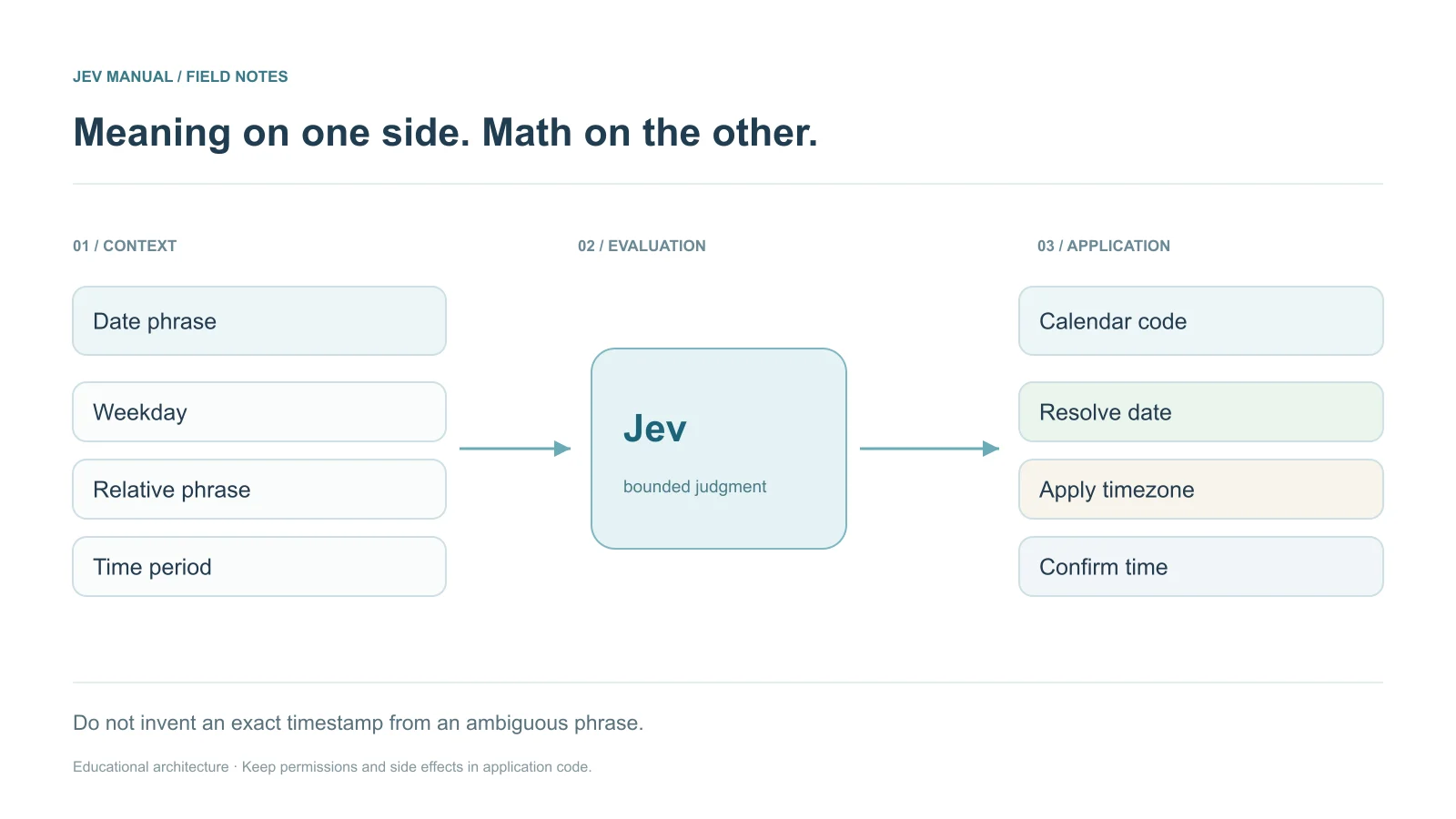
Natural-language phrase → bounded semantic components → deterministic calendar resolution → exact-time confirmation
The program deliberately handles one relative-date convention. The model extracts a weekday and period; code calculates the date. For explicit dates, parse month/day/year candidates in code, validate the calendar date, and use Jev only when a semantic selection is needed.
Prerequisites and sample input
Use Python 3.10+; these standalone examples use only the standard library. Live evaluation also requires TYPESAFE_API_KEY in the environment. Download the complete script below rather than copying disconnected fragments.
{
  "text": "Let's schedule the review next Thursday afternoon.",
  "reference_date": "2026-09-21",
  "timezone": "America/Los_Angeles",
  "convention": "next weekday means strictly after the reference date"
}
Step 1 — Prepare the evidence
Keep the input shape stable and distinguish verified application facts from user claims. The program deliberately handles one relative-date convention. The model extracts a weekday and period; code calculates the date. For explicit dates, parse month/day/year candidates in code, validate the calendar date, and use Jev only when a semantic selection is needed.
Step 2 — Define the atomic questions
{
  "relative_expression": {
    "type": "choice",
    "instructions": "Which listed temporal expression appears in text?",
    "criteria": {
      "next_weekday": "A named next weekday",
      "explicit_date": "A literal calendar date",
      "other": "No supported expression"
    }
  },
  "weekday": {
    "type": "choice",
    "instructions": "Which weekday is named?",
    "criteria": {
      "Monday": null,
      "Tuesday": null,
      "Wednesday": null,
      "Thursday": null,
      "Friday": null,
      "Saturday": null,
      "Sunday": null,
      "none": null
    }
  },
  "time_period": {
    "type": "choice",
    "instructions": "Which period of day is named?",
    "criteria": {
      "morning": null,
      "afternoon": null,
      "evening": null,
      "unspecified": null
    }
  }
}
The question names map outputs back to your code. They are not inference instructions. Put the actual judgment in instructions, and use criteria for category descriptions or ordered levels.
Step 3 — Read answers and apply a gate
The standalone script checks required answer keys, types, allowed categories, numeric ranges, and confidence. Missing or malformed data stops the decision path. The following action policy uses educational thresholds; none have been measured on your data.
def decide(answers, state):
    from datetime import date, timedelta
    if min(value["confidence"] for value in answers.values()) < .85:
        return {"route": "clarify", "scheduled": False}
    weekdays = ["Monday", "Tuesday", "Wednesday", "Thursday", "Friday", "Saturday", "Sunday"]
    weekday = answers["weekday"]["choice"]
    if answers["relative_expression"]["choice"] != "next_weekday" or weekday not in weekdays:
        return {"route": "unsupported_expression", "scheduled": False}
    reference = date.fromisoformat(state["reference_date"])
    delta = (weekdays.index(weekday) - reference.weekday()) % 7 or 7
    resolved = reference + timedelta(days=delta)
    return {"date": resolved.isoformat(), "timezone": state["timezone"],
            "period": answers["time_period"]["choice"], "scheduled": False,
            "route": "confirm_exact_time"}
Step 4 — Keep execution separate
The program prints a route or candidate result. A real executor must apply its own permissions, validation, idempotency, and confirmation requirements. A model label is evidence for a decision, not authorization to perform a consequential action.
Run it
Download the complete date-extraction.py program. Then run:
python date-extraction.py
# After configuring TYPESAFE_API_KEY, opt in to a live billed call:
python date-extraction.py --live
Fixture mode makes no network request and requires no credential. Live mode makes a single call with a 30-second timeout. It does not silently retry or execute any downstream action. For a production queue, add a bounded retry policy for transient failures and a durable review destination.
Expected fixture result
{
  "date": "2026-09-24",
  "timezone": "America/Los_Angeles",
  "period": "afternoon",
  "scheduled": false,
  "route": "confirm_exact_time"
}
This output is deterministic fixture data, not a measured Jev response. A live model may produce different values and routes. Keep the full returned probability distributions when diagnosing that difference.
Read the probabilities
A Choice winner alone does not reveal ambiguity. Compare its confidence and distribution with the selected label. A Score is an ordered semantic value; use its legend before applying numeric thresholds. A Noul is the probability of yes and has no separate confidence field.
Failure cases and production improvements
“Next Thursday” can mean different weeks to different people. “Afternoon” is not an exact timestamp. Do not silently select 3 p.m. Ask for clarification and preserve the intended timezone; daylight-saving transitions need a timezone-aware scheduling layer.
Pin the tested model, log the returned version and rubric revision, and keep a small evaluation set under version control. Re-test after changes to inputs, provider, questions, or policy. Avoid logging sensitive input by default.
Complete code
The downloadable standalone script includes request construction, fixture data, response validation, the decision function, and command-line execution. It uses the direct HTTP API so no SDK dependency is required. For SDK versions of the core ticket request, see Python and JavaScript.
What to test before shipping
- With reference date 2026-09-21, Thursday resolves to 2026-09-24.
- If today is Thursday, strictly-next means seven days later.
- An unsupported expression does not create an event.
- No exact time is invented from “afternoon.”
- Network failures, invalid JSON, and missing fields must never become an automatic action.
- Compare several thresholds on labeled data and record the resulting review volume.